
As the number of video and information sources in today's workplaces continues to grow, small control rooms, meeting rooms, and multimedia environments often need to connect multiple computers and other AV sources while displaying different types of content across multiple screens. Although conventional devices can switch between video sources, simultaneously displaying multiple sources, adjusting display layouts, and operating different computers often requires several separate devices. This not only takes up additional space but also makes daily operation more complicated.
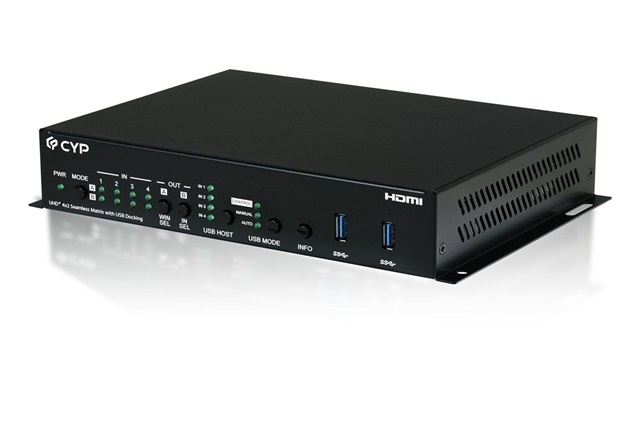
To meet the growing demand for multi-source video integration and simplified operation, CYP has introduced a new 4K60 seamless matrix switcher (model number: CPLUS-V4H2HUSB). In addition to routing any of the four AV sources to two displays, the matrix switcher allows users to arrange all four sources in Picture-in-Picture (PiP), Picture-on-Picture (PoP), or quad-view layouts. Users can operate connected computers through a single keyboard and mouse, while the on-screen windows can be repositioned and resized simply by dragging them with the mouse. As a result, multi-window layouts can be configured more intuitively and adapted to specific operational needs.
The matrix switcher features two HDMI inputs and two USB Type-C inputs for connecting desktop computers, laptops, and other video devices. Two HDMI outputs support connections to two displays, with resolutions of up to 4K@60Hz 4:4:4 for clear, high-quality video.
In matrix mode, users can switch seamlessly between video sources without the displays temporarily going black while the signal is being re-established. This ensures uninterrupted operation during system control, meetings, and video presentations. In addition to controlling multiple computers with a single keyboard and mouse, users can resize and reposition PiP windows by dragging them with the mouse, making multi-window operation as intuitive as rearranging windows on a computer desktop.
Both USB Type-C inputs support video, USB data, and network connectivity while providing up to 45W and 30W of power delivery, respectively. With a single USB-C cable, users can quickly connect a laptop to the system to transmit video, access the keyboard and mouse, connect to a wired network, and receive power at the same time. The matrix switcher can also be controlled through its front-panel buttons, a mouse-operated on-screen display, Ethernet, or RS-232, allowing it to be used as a standalone device or integrated into an existing meeting room or control system.
In a small control room, operators can combine live video, system status, data, and alarm notifications within a single display layout. The main window can be used for content that requires continuous attention, while smaller windows display supporting information. Alternatively, a quad-view layout can be used to monitor four sources simultaneously. With a single keyboard and mouse, operators can access and control different systems. When the cursor moves over a specific window, that window is highlighted with a border, helping operators confirm which system is currently active and reducing the possibility of errors when working across multiple systems.
In meeting room applications, the matrix switcher can integrate presentations, video conferencing, participant feeds, and real-time data into a single viewing environment. For example, presentation content can be shown in the main window, while additional windows display remote participants, meeting materials, or reference information relevant to the discussion. Users can enlarge the content currently under discussion by dragging and resizing its window or reposition different sources to create a more suitable layout. When multiple types of information need to be viewed simultaneously, users can switch to a side-by-side or quad-view layout, reducing the need to repeatedly switch between sources.
For multimedia and video presentation applications, the four video sources can be arranged in different layouts according to content and production requirements. This makes the matrix switcher suitable for live events, video monitoring, training sessions, product demonstrations, and corporate information displays. During a live event, for instance, the speaker, presentation materials, camera feed, and event information can be combined within a single layout. Likewise, production and monitoring teams can view multiple video sources simultaneously and quickly reposition or resize windows with the mouse as the event progresses or content priorities change.
As video and information sources continue to increase, users need more than additional displays. They also need the flexibility to reorganize information for different scenarios and quickly access multiple systems. By combining dual-display 4K outputs, flexible multi-window layouts, drag and resize operation, seamless switching without black screens, and single keyboard and mouse control, CYP helps small control rooms, meeting rooms, and multimedia environments create clearer, more flexible, and more efficient video integration workflows.
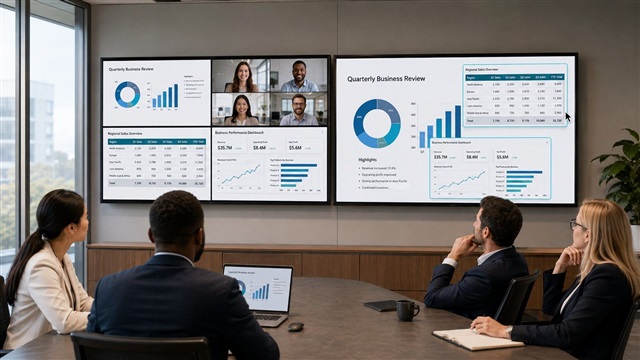
Multi-view Display For Conference. Credit: Cypress Technology